
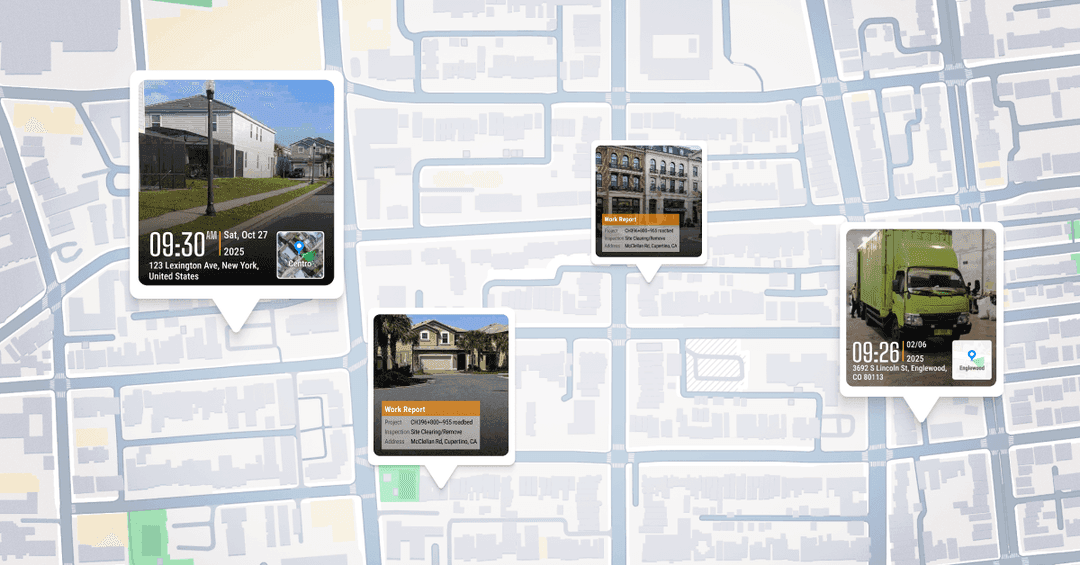
Under the U.S. Department of Energy (DOE) Home Energy Rebates Program (HEAR), contractors and inspectors face a strict mandate: every installation must be backed by geotagged photos. These images serve as primary evidence that energy efficiency improvements—such as HVAC upgrades or insulation—actually took place on-site.
However, meeting DOE guidance isn't as simple as snapping a picture. The requirements demand embedded GPS coordinates and valid timestamps within the metadata—details that are surprisingly easy to lose in the field.
The Challenge with DOE Photo Guidance
The official DOE and PNNL guidance suggests using standard phone cameras with location settings turned on. In theory, this works. In the reality of a busy jobsite, it often leads to rejected claims and payment delays due to three main issues:
1. Fragile Metadata (EXIF Data)
When you take a photo using a regular phone camera, the GPS data lives inside the "hidden" EXIF metadata. This data is extremely fragile. It can be stripped out or corrupted when:
Sending photos through messaging apps (SMS, WhatsApp, etc.).
Uploading from certain Android devices to cloud storage.
Renaming or editing files during office processing.
2. Device Inconsistency
Many mobile operating systems have strict privacy settings that may prevent the camera from "stamping" the location onto the file, even if GPS is turned on. When this happens, the DOE may require screenshots of the photo properties or additional supporting documents, adding weeks to the approval process.
3. Manual VerificationHow to Capture Geotagged Photos in 3 Easy Steps
Using Timemarker to meet government requirements is designed to be "field-proof":
Launch & Select: Open the Timemarker app and select your specific HEAR project template.
Snap & Verify: Take the photo. The app automatically pulls verified network time and GPS coordinates—no more manual timestamping.
Sync & Submit: Photos are saved to the cloud instantly. You can export a clean, professional PDF or ZIP file containing all necessary geotagged evidence for your rebate claim.
Burden
For managers handling dozens of projects, verifying EXIF data manually is a nightmare. Reviewers must dig into hidden file properties to cross-check locations against job records—a process that is slow, error-prone, and hard to scale.
Timemarker GPS: Compliance Built Into Every Pixel
This is where Timemarker GPS changes the game. Instead of hoping the metadata survives the upload process, our technology builds compliance directly into the visual layer of the photo.
With timemarkergps.com, field teams capture "evidence-grade" photos that are ready for submission the moment they are taken.
Why Timemarker GPS is the Choice for HEAR Contractors
Visual Proof That Can't Be Stripped: We stamp the Date, Time, GPS Location, and Project Name directly onto the image. Even if the file is compressed or shared via chat, the proof remains visible.
Offline Reliability: Field work often happens in basements or remote areas. Timemarker captures precise GPS coordinates offline and syncs them to your Teamspace the moment you're back in range.
Zero-Effort Organization: Photos are automatically grouped by project. Reviewers don't need to guess which home or unit they are looking at—the photo provides all the context.
Built for Government & Audit Transparency
Timemarker helps teams bypass the common "red tape" of federal rebate programs. By using our verified photo system, you ensure:
No screenshots required: The data is right there on the image.
Faster approvals: Reviewers trust the clear, visible GPS watermarks.
Audit-Ready Records: Maintain a long-term, searchable database of every project.
Final Thought
In the world of federal rebates and energy audits, a photo error isn't just a mistake—it's a payment delay. Timemarker GPS turns complex DOE photo rules into a seamless, one-click workflow.
Keep your projects moving and your documentation bulletproof. Visit timemarkergps.com to start your professional documentation today.